You're on the 32-bit build · Looking for 64-bit? Click here for the 64-bit build →
Windows 10 & 11 · 32-bit

Snipe for
Windows 10 & 11

The 32-bit edition for Windows 10 and Windows 11 — one of several Snipe builds across supported operating systems. The same de-Googled Chromium 140 with uBlock Origin and Ruffle in the core, built for 32-bit hardware and lean virtual machines where every megabyte counts.

Version 140.0.7339.127 (32-bit) · based on Chromium 140 · V8 14.0.365.4
© 2026 Snipe Group Limited, Covent Garden, London
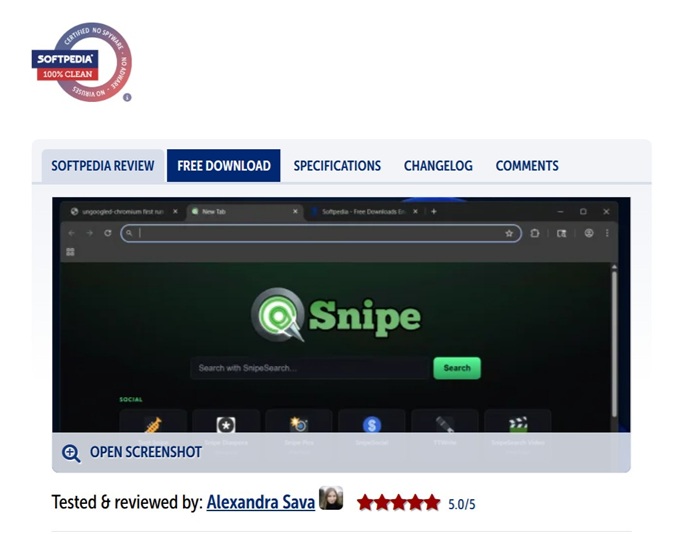
snipe://newtab
Snipe new tab page with SnipeSearch and ecosystem shortcuts on Windows 10 32-bit
1 GB
RAM tested
32-bit
Windows 10 & 11
Zero
Google telemetry
No AI
Of any kind
What's in the build

Everything built in, nothing phoning home.

Every component that would ordinarily call Google infrastructure has been removed or replaced. The privacy tools that matter ship inside the core binary rather than as add-ons that can be disabled or break.

🎯

Zero Telemetry

Sync, crash reporters, update daemons and cloud features stripped from the binary. The browser does what you tell it — nothing more.

🛡

uBlock Origin Core

Compiled into the browser, active from the first page load, and impossible to disable by accident. Curated whitelist of contextual, non-tracking ad networks.

🎮

Ruffle / Flash

The Rust + WebAssembly Flash emulator is built into the core. SWF games and media — including audio — run natively with no plugin to install.

🔑

Local Password Manager

Credentials, payment methods and addresses are stored encrypted on-device. Nothing is uploaded unless you sign in and explicitly enable sync.

🔌

Server-Respecting HTTP/S

What you type wins. No forced HTTPS upgrades that trap HTTP-only servers, intranet hosts and self-signed setups in redirect loops.

🔍

SnipeSearch Default

Address-bar searches go to SnipeSearch, not Google. The new tab opens the full SnipeSearch ecosystem on every launch.

📖

Local Dictionaries

Spell-check and autocorrect use bundled dictionaries. No connection to Google's enhanced spell-check service.

🌙

Background Off

Background apps are disabled by default — closing the window stops every Snipe process cleanly. No lingering daemons.

Download · v140.0.7339.127

Two ways to run Snipe.

Both builds are the 32-bit Snipe for Windows 10 and Windows 11. Choose the installer for a normal desktop install, or the portable ZIP to run from any folder or USB drive with no installation.

No install

Portable (.zip)

Extract and run — nothing is written to Program Files and no installation is required. Ideal for USB drives, locked-down machines, or running alongside an existing Chrome or Edge install.

File · SnipeBrowser-140.0.7339.127-win-x86-portable.zip
⬇ Download Portable ZIP

System requirements

On 64-bit Windows? Use the Windows 10 & 11 64-bit build instead.

Streaming DRM

Adding Widevine for Netflix & Disney+.

Snipe does not ship Widevine — it is a proprietary, closed-source blob and bundling it would contradict the open nature of the project. Because Snipe is built on Chromium 140 it uses the same DRM path as Chrome, so you can add it yourself in four steps.

01

Locate the files

From an existing Chrome/Edge 140 install, find the WidevineCdm folder at C:\Program Files\Google\Chrome\Application\<version>\WidevineCdm\.

02

Copy into Snipe

Copy the whole folder so the path becomes C:\Program Files (x86)\Snipe\Application\140.0.7339.127\WidevineCdm\ (use the 32-bit win_x86 DLL).

03

Restart & verify

Close all Snipe processes, reopen, and check chrome://components for "Widevine Content Decryption Module".

04

Test playback

Open Netflix or Disney+ and play a title. If it plays, DRM is correctly installed. Match the Chromium 140.x version.

Widevine is owned by Google and its use is subject to Google's licence terms. Snipe Group Limited does not distribute, endorse, or support Widevine — DRM configuration is entirely the user's responsibility. No Chrome or Edge? Extract WidevineCdm from any Chromium 140.x build instead.
On every new tab

The SnipeSearch ecosystem.

The new tab page groups the full network of privacy-first services into Social, Services and Resources — all reachable in one click, no Google account required.

Social

  • Toot Snipe — Mastodon-compatible
  • Snipe Diaspora — Diaspora node
  • Snipe Pics — Pixelfed photos
  • SnipeSocial — tolerant network
  • TTWrite — microblogging
  • SnipeSearch Video — PeerTube

Services

  • SnipeSearch — default engine
  • Snipe Adclicks — ad marketplace
  • SnipeOffice — web office suite
  • SnipeSearch Ark — extension store
  • SnipeSearch Maps
  • SnipeSearch Asia & Info

Resources

  • Snipe Play — Flash games (Ruffle)
  • SnipeSearch Movies — TV/film database
  • SnipeSearch Music — streaming
  • Snipe Support — help centre, not AI
Every user matters

How Snipe compares.

FeatureSnipeChromeDDG
Zero Google Telemetry
uBlock Origin built into core
Ruffle / Flash restored
Local-only password manager
Server-respecting HTTP/HTTPS
No forced updates
Background processes off by default
No AI features