Chromium 154 for aarch64 machines: Chromebooks on SnipeOS, ARM laptops, and boards that speak arm64. Same privacy stack as every other Snipe build: de-Googled, uBlock Origin and Ruffle in the core, SnipeSearch as default.
This build reports Linux aarch64 in the user agent, with a trailing arm64 token after Snipe/. Update Check and Browser Check treat that as channel linuxarm64, so Chromebook and other aarch64 installs are not compared against the Ubuntu amd64 140 release.
Need the PC (x86_64) package instead? Use the Ubuntu 18.04+ amd64 page. Looking for the full Chromebook OS image? See SnipeOS.
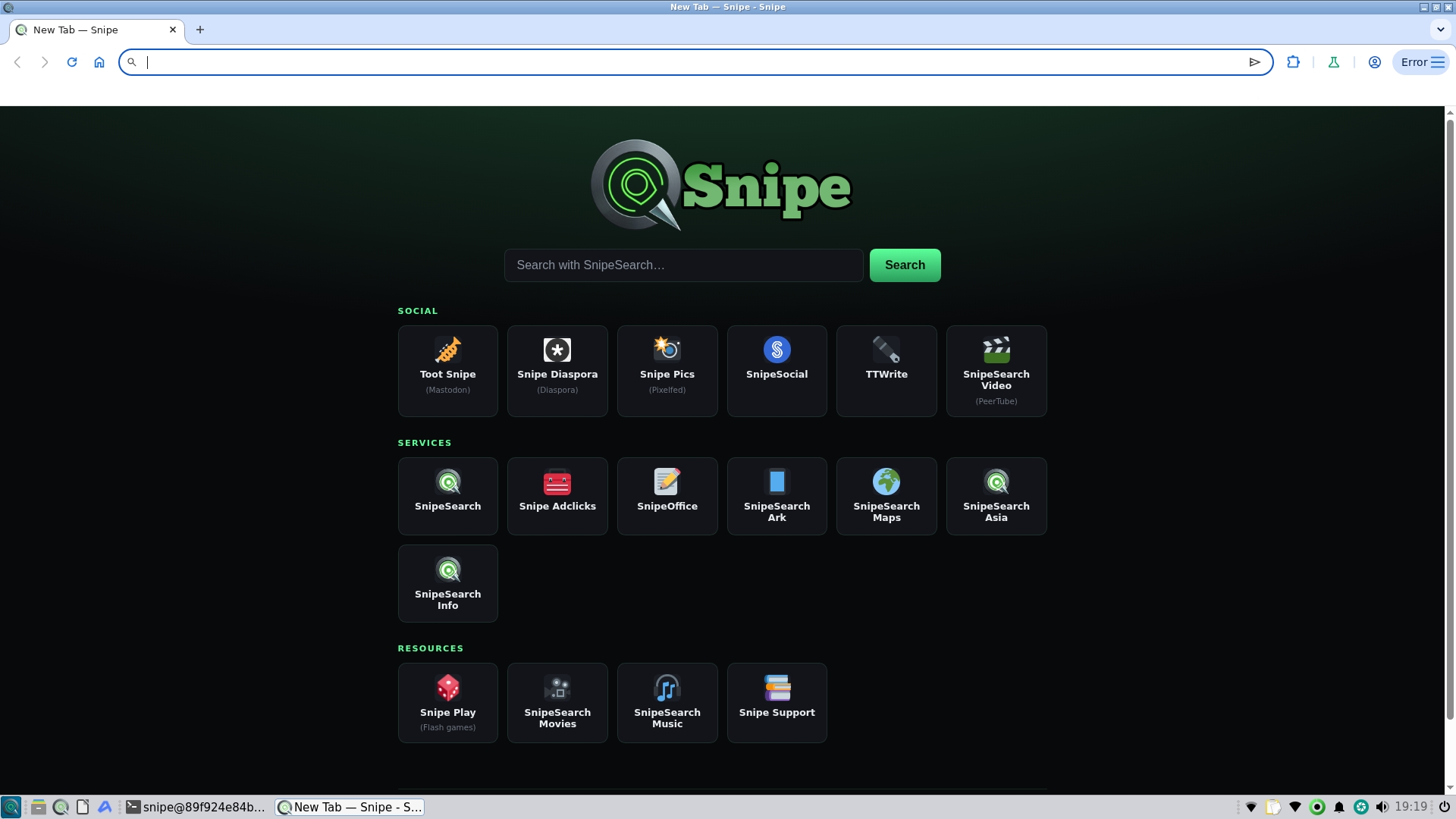
What you might see: On some launches, especially the first window after start, a red Error label appears on the three-dot menu (top right), not on the extensions puzzle icon. Open that menu, choose the extensions error entry, then back out. The label clears.
Why: Built-in extensions (including uBlock Origin) sometimes finish loading after the first page has already painted. Whichever CPU path wins that race decides whether the menu shows Error. Harmless timing quirk on arm64; your extensions are fine.
Package file: snipe-browser_154.0.8037.45-1_arm64.deb. Pick a system .deb install, or unpack the portable tarball if you prefer not to install system-wide.
Download snipe-browser_154.0.8037.45-1_arm64.deb from Archive.org. Open your Downloads folder and double-click the file. On Debian-based desktops, the software centre opens; click Install and enter your password when prompted.
Run these two commands in order. Copy and paste each line as shown.
wget https://archive.org/download/snipe-browser-154.0.8037.45-1.aarch64/snipe-browser_154.0.8037.45-1_arm64.deb
sudo apt install ./snipe-browser_154.0.8037.45-1_arm64.deb
SnipeSearch as default, uBlock Origin in the core, Ruffle for Flash content, and a custom new-tab page — all without Google services or background telemetry.
uBlock Origin compiled into the binary. Blocks tracking networks with a curated whitelist for privacy-respecting ads.
Built-in Flash emulation — games and legacy interactive content run inside the modern sandbox without plugins.
Private search routing out of the box — no Google as the default engine.
Offline password manager and bundled dictionaries. No forced cloud sync or AI components.
Built for aarch64. Ships in SnipeOS for Chromebook and installs on other arm64 Linux desktops.
Standard Debian package — integrates with the software centre, desktop shortcuts, and your package manager.
Optional self-contained tarball when you want to unpack and run without a system install.
No on-device models, no cloud assistants, no generative tools baked in.
Real Chromebook hardware on the FENNEL14 / kukui channel: new tab, Browser Check with the aarch64 user agent, Update Check with arch=arm64, and desk shots of the same machine.
arm64 / aarch64 only. Not for amd64 PCs (use Ubuntu 18.04+). Not the Android APK (that is a separate channel). If you would like to try SnipeOffice, it is available as a separate download.
Desktop: Download snipe-browser_154.0.8037.45-1_arm64.deb, then double-click it in your file manager. The software centre opens the package — click Install.
Terminal: Fetch the package from Archive.org, then install it with apt.
wget https://archive.org/download/snipe-browser-154.0.8037.45-1.aarch64/snipe-browser_154.0.8037.45-1_arm64.deb
sudo apt install ./snipe-browser_154.0.8037.45-1_arm64.deb
⬇ Download .deb
Self-contained tree for machines where you prefer not to install a system package. Extract somewhere writable and launch the snipe binary inside.
wget https://archive.org/download/snipe-browser-154.0.8037.45-1.aarch64/snipe-154.0.8037.45-linux-arm64.tar.gz
tar -xzf snipe-154.0.8037.45-linux-arm64.tar.gz
⬇ Download .tar.gz
No. This package is arm64 only. For x86_64 Linux use the Ubuntu 18.04+ amd64 .deb or the openSUSE Leap .rpm.
The browser user agent includes Linux aarch64 and a trailing arm64 after Snipe/. The check URL also accepts ?os=linux&arch=arm64. Together those select the linuxarm64 channel (154), not the amd64 Ubuntu track (140).
No. Android 10+ is a separate APK / Play channel. This page is desktop Linux arm64 (.deb and portable tar).
Usually not. On arm64 the built-in extensions can finish loading after the first page paints, so the three-dot menu sometimes shows Error (not the puzzle-piece icon). Open the menu, tap the extensions error line, then back out. It is intermittent and depends on which process finishes first. If the label clears after that, you can ignore it.
Export them as a CSV from Google Password Manager or Brave, then import that file into Snipe's local Password Manager (open chrome://password-manager/settings and use Import passwords). Full walkthrough: Import Google / Brave passwords into Snipe.